🎯 Week 2 Learning Path
What you should be able to do
- Select a
switchwhen one value has several meaningful cases. - Use a dictionary for key–value lookup and handle a missing key as an optional.
- Define a
structthat groups related data and behaviour. - Explain when value semantics (struct) or shared identity (class) matters.
- Split functions into files and call them from
main.swift.
A decision process for modelling
- Name the real-world thing or operation.
- List the values it must store and the actions it must perform.
- Choose the simplest type that preserves those rules.
- Test a typical case, a boundary case, and a missing or invalid case.
Checkpoint: do not force-unwrap an optional just to silence the compiler. Handle it with optional binding, a default value, or an early return, and explain why your choice fits the task.
🚀 Steps to Start a New Swift Project in Xcode
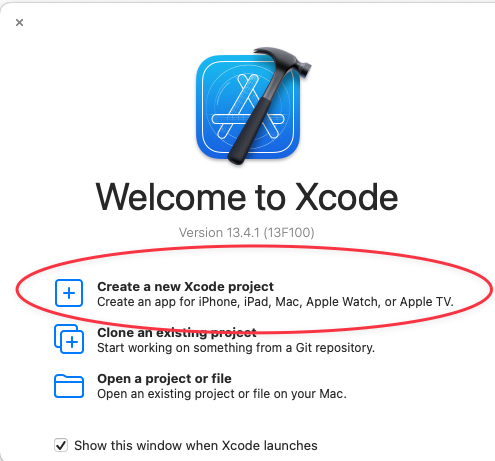
Step 1: Create a New Project
Open Xcode. When the "Welcome to Xcode" window appears, click on "Create a new Xcode project".
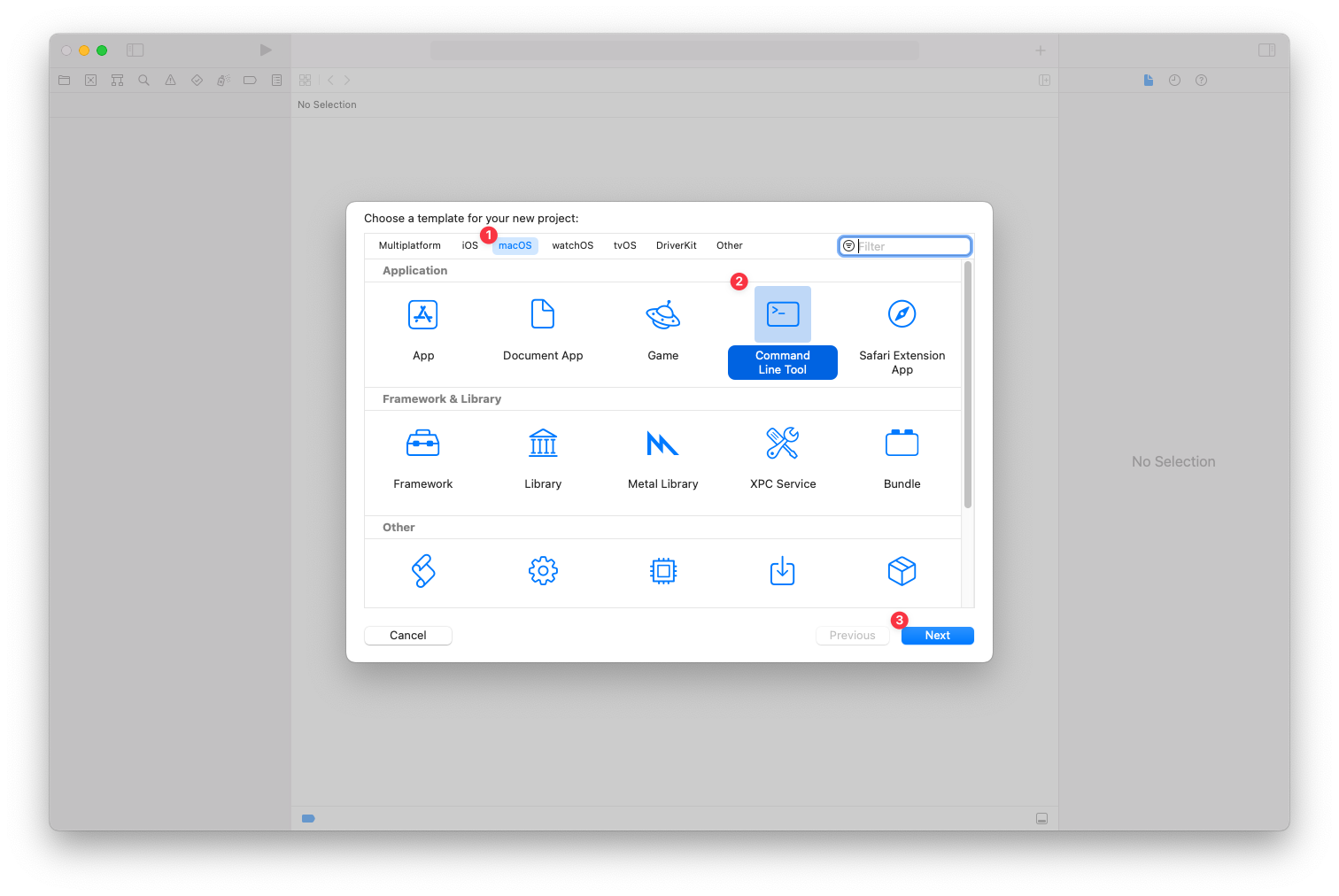
Step 2: Choose a Template
In the template selection window, first select the "macOS" tab. Then, choose the "Command Line Tool" template from the available options and click "Next".
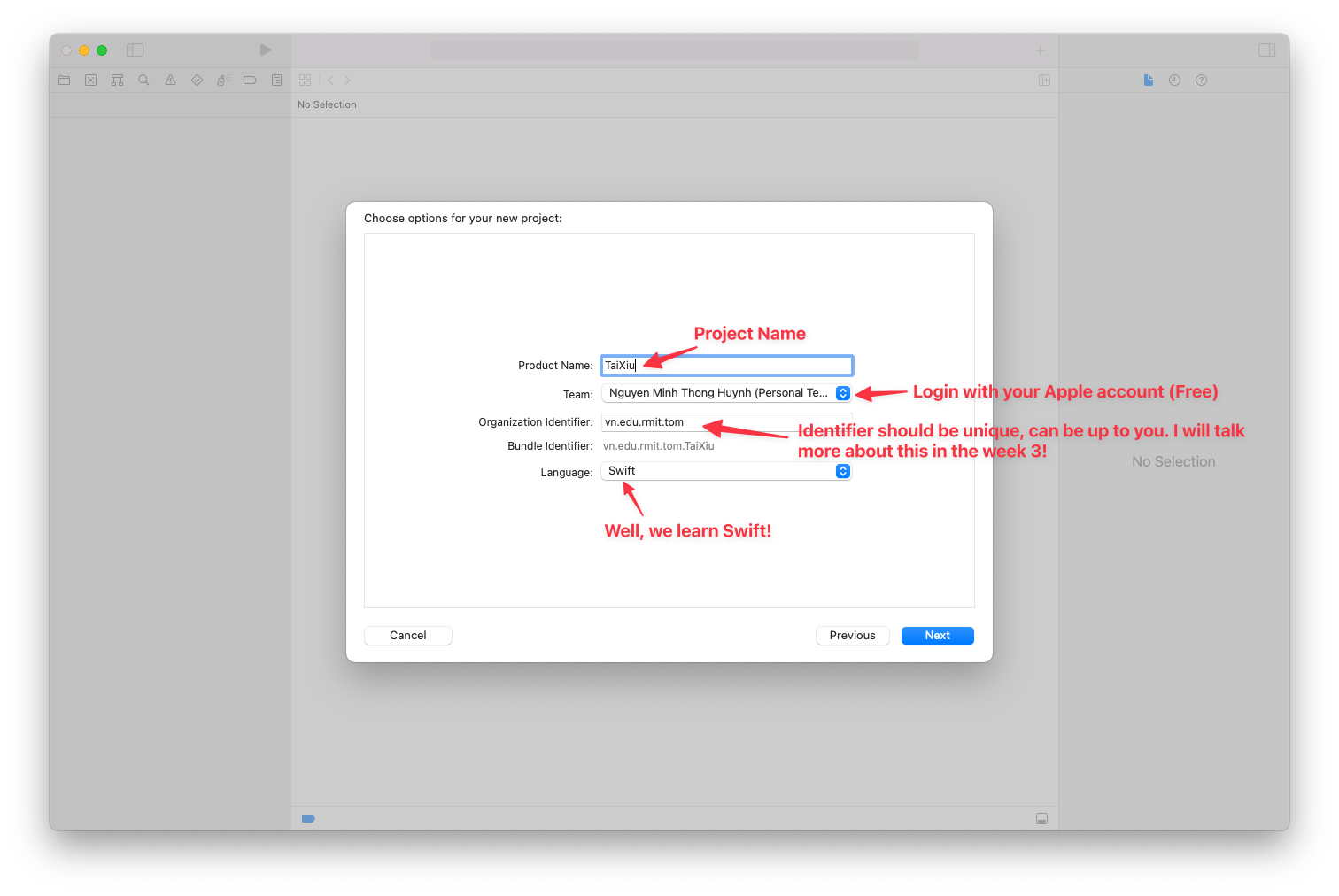
Step 3: Configure Project Options
On the next screen, fill in your project details. Enter a "Product Name" (for example, TaiXiu) and provide an "Organization Identifier" if needed. Make sure the "Language" is set to "Swift", then click "Next".
Step 4: Save the Project
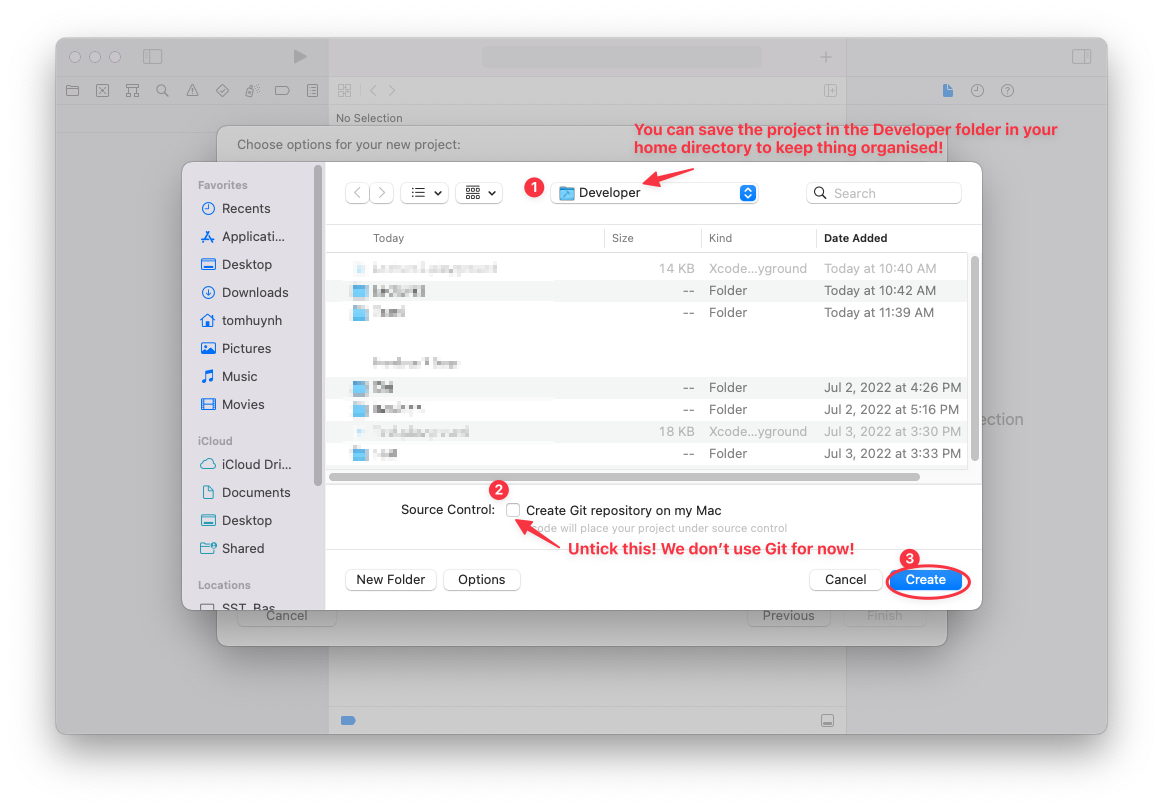
Choose a location to save your new project, such as the "Developer" folder. Make sure to untick the checkbox labeled "Create Git repository on my Mac", and then click the "Create" button.
Step 5: Write and Run Your Code
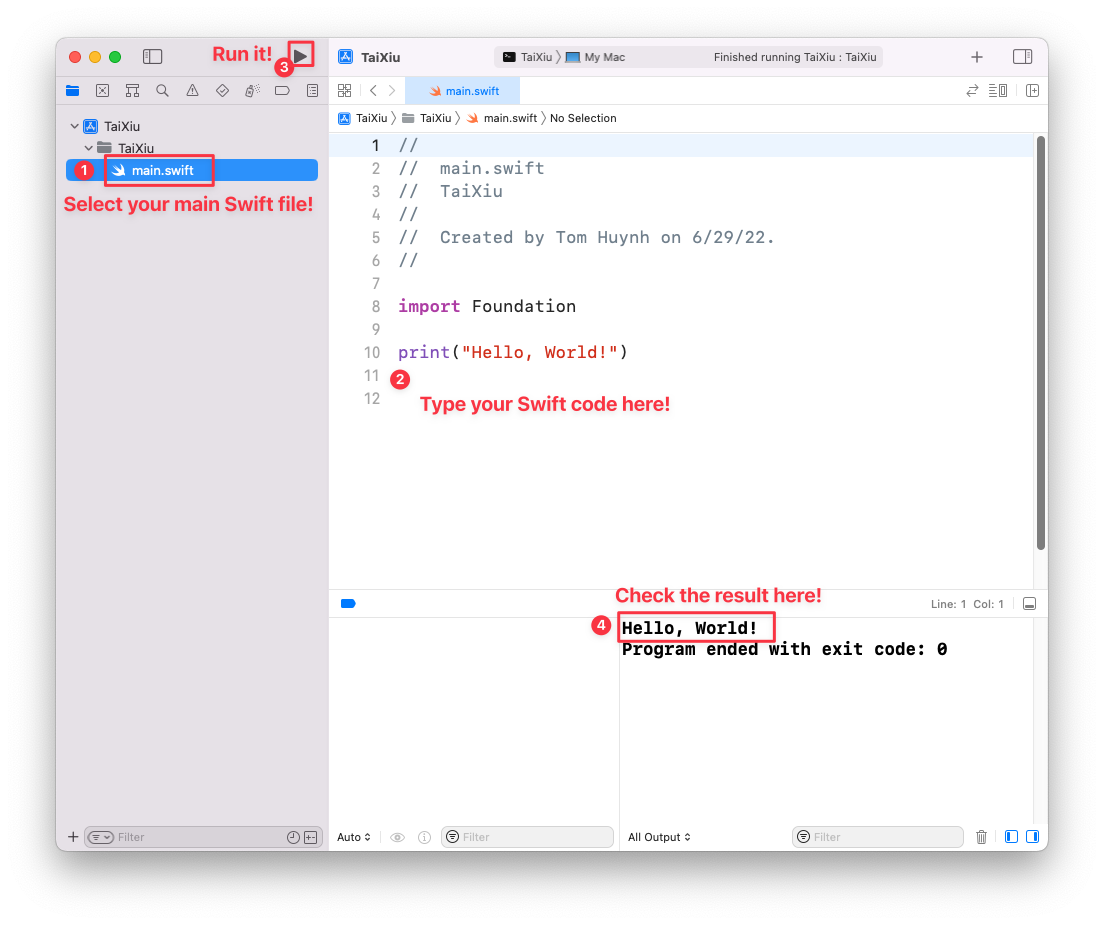
In the project navigator, select main.swift and enter
print("Week 2 ready"). Click Run (▶) and confirm that the message appears once
in the debug console. This verifies the correct target and entry file before you create the
exercise files.
📂 How to organize your swift files in Xcode
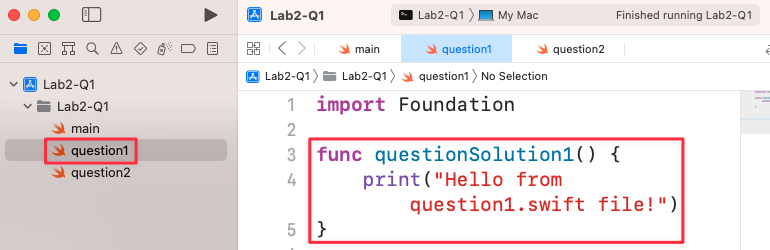
Step 1: Create a function in your first Swift file (question1.swift)
Instruction: In Xcode, you can organize your code into multiple files. Apart from the special main.swift file, you cannot write code directly at the top level of other Swift files. Instead, you need to place your code inside functions. In this step, a new file named question1.swift has been created. Inside this file, a function called questionSolution1() is defined to hold the code that will print a message.
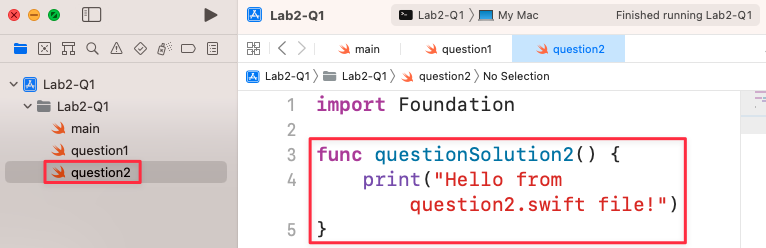
Step 2: Create a function in your second Swift file (question2.swift)
Instruction: Similarly, create another file named question2.swift. Just like in the previous step, define a function within this file to hold your code. Here, a function named questionSolution2() is created to print a different message. This practice of separating code into different files and functions makes your project more organized and easier to manage.
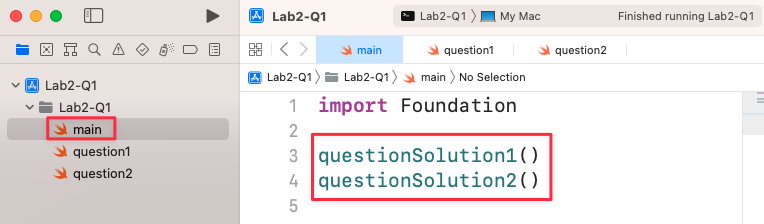
Step 3: Call your functions from the main.swift file
Instruction: The main.swift file is the entry point of your application. When you run your program, the code inside main.swift is executed from top to bottom. Unlike other Swift files, you can write top-level code here without needing to wrap it in a function. To execute the code from your other files, you simply call the functions you created (questionSolution1() and questionSolution2()) from within main.swift.
Step 4: Run the program and observe the output
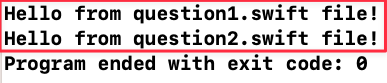
Instruction: After setting up your files and calling the functions in main.swift, run your project. The output console will display the results. The messages from both question1.swift and question2.swift are printed in the order they were called in main.swift. The message "Program ended with exit code: 0" indicates that your program ran successfully without any errors.
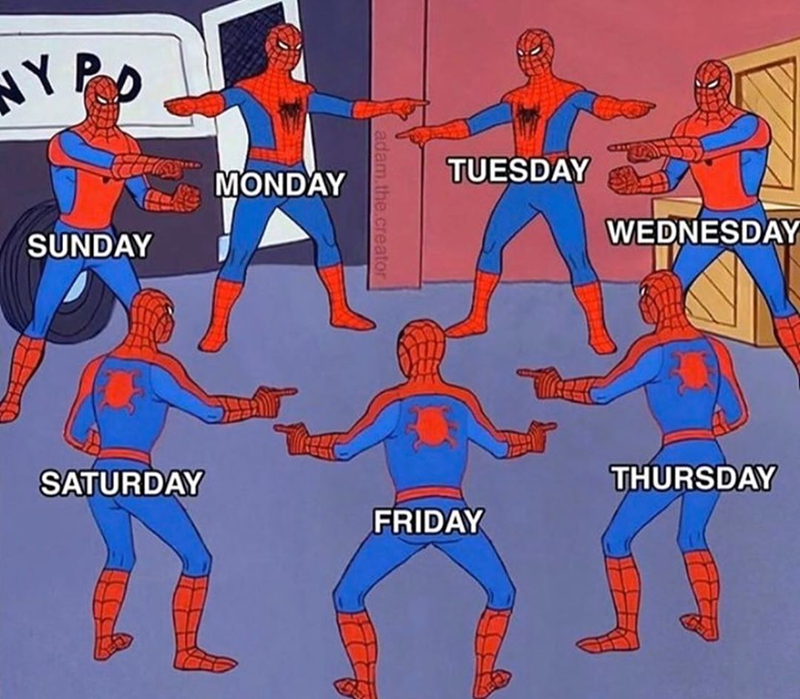
🗓️ Question 1. Switch (Daily Vibe Check)
Description
Create a program that takes a number (Int) as an input and prints the corresponding daily vibe using a Switch statement.
The daily vibes for each day (1-7) should be:
- 1: Monday: Brain rot / No rizz
- 2: Tuesday: NPC grindset / Trying to cook
- 3: Wednesday: We are so back / Skibidi energy
- 4: Thursday: Delulu is the only solulu
- 5: Friday: Main character energy
- 6: Saturday: Absolute cinema / W rizz / No cap
- 7: Sunday: Sunday scaries / Sleeping on the grind
If the input number does not match a day of the week then your program should print "Invalid day" (or return "an invalid day!" to match the sample output format).
func vibeCheck(day: Int) -> String{
    //Complete the function body
}

print("Enter a day of a week (1-7):")
if let dayString = readLine(){
    if let dayInteger = Int(dayString){
        print("The vibe is \(vibeCheck(day: dayInteger))")
    } else {
        print("Error: the correct format of day must be 1-7!")
    }
}
Sample Outputs:
Enter a day of a week (1-7):
1
The vibe is Monday: Brain rot / No rizz

Enter a day of a week (1-7):
5
The vibe is Friday: Main character energy

Enter a day of a week (1-7):
20
The vibe is an invalid day!

Enter a day of a week (1-7):
hello
Error: the correct format of day must be 1-7!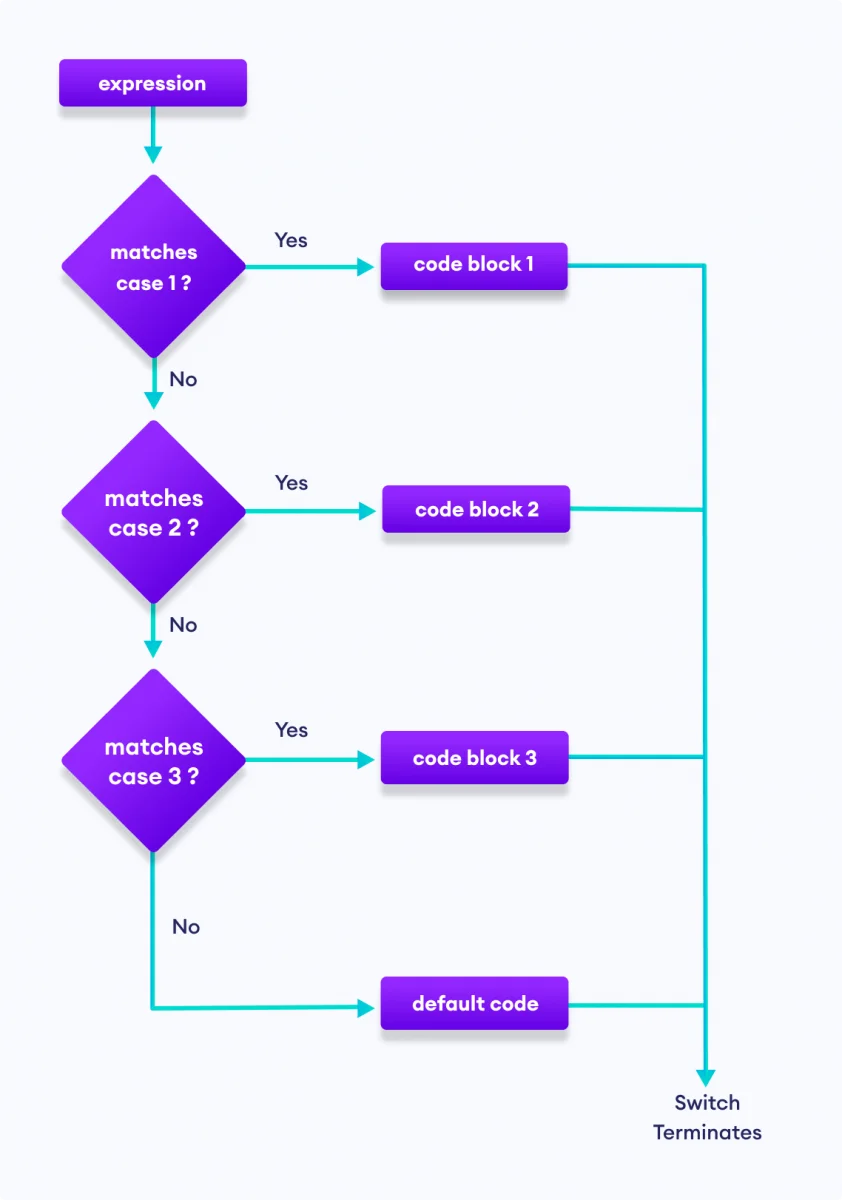
📖 Question 2. Dictionary (RMIT Lore & Stats)

Description
You have a dictionary to store interesting fun facts/figures of RMIT Vietnam. However, there are a few wrong pieces of information you need to fix:
- The number of graduates is 25500 instead of 20500.
- The number of student clubs is 60 instead of 50.
- The QS World Ranking is 123 instead 150
Also, we want to add a few more entries in our dictionary as following:
- yearFounded: 1887
- numberOfStaffs: 12000
//Don't change this dictionary
var funFactsRMIT: [String: Int] = [
    "numberOfStudents" : 12000,
    "numberScholarships": 1900,
    "numberOfGraduates": 20500,
    "numberMasterPrograms": 100,
    "numberPhDPrograms": 3,
    "numberStudentClubs": 50,
    "QSWorldRanking": 150,
]

//Write your code here (update values of some entries, add new entries in the
//dictionary and print out some entry values like in the sample output)
The expected output should be:
Here are some fun facts of RMIT:
The Number Of Students: 12000
The Number Scholarships: 1900
The Number Of Graduates: 25500
The Number Master Programs: 100
The Number Phd Programs: 3
The Number Student Clubs: 60
The Qs World Ranking: 123
The Year Founded: 1887
The Number Of Staffs: 12000
There are 9 facts in our fun facts dictionary about RMIT!
❔ Question 3. Optionals (Loot Splitter)
Description
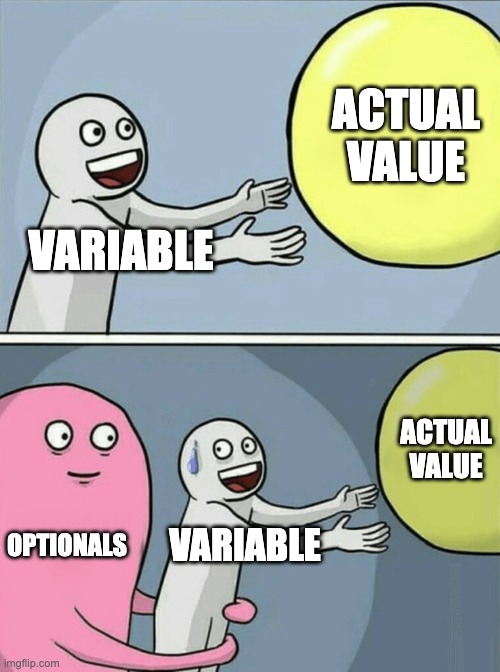
First, create a function that checks if a legendary loot drop can be evenly split among a squad without a remainder. The function should return nil if the division doesn’t produce a whole number. Name the function splitTheLoot.
Then, write code that tries to unwrap the optional result of the function. There should be two cases: upon success, print "W, everybody gets \(x) items", and upon failure, print "L, we can't split this fairly.".
Finally, test your function:
- Split 10 items by 2 players. This should print "W, everybody gets 5 items."
- Split 10 items by 3 players. This should print "L, we can't split this fairly."
func splitTheLoot(loot: Int, squadSize: Int) -> Int? {
    // Complete the body of the function
}

print("Enter the total loot:")
let loot = readLine()      // Remember, this is an optional string
print("Enter the squad size:")
let squadSize = readLine()   // Remember, this is an optional string
// Complete your code below to optional binding to unwrap safely the values of
// splitTheLoot, these inputs of readLine()
Sample Outputs:
Enter the total loot:
10
Enter the squad size:
2
W, everybody gets 5 items

Enter the total loot:
10
Enter the squad size:
3
L, we can't split this fairly.

Enter the total loot:
9
Enter the squad size:
3
W, everybody gets 3 items
🏗️ Question 4. Structure (Streamer Profile)
Description
You have been hired to build the backend for the next big streaming platform, called NoCap.tv.
Define a Structure
As part of this app, you need to define a struct called StreamerProfile to represent a user. This struct needs to hold onto the user's username, discordTag (optional), number of followers, and whether they are live or not. The StreamerProfile struct needs to have the properties:
- username
- discordTag?
- followers
- isLive
The Struct also needs to have a method called logStatus(). If the user is active, the method needs to print "XXX is streaming to millions!". Otherwise, it needs to print "XXX is touching grass." (where XXX is the username).
Initialise the Structure
After you have defined the struct, choose your own favorite streamer or celebrity. Create a profile for them with 0 followers who are not currently live. Then, print the status of this user to the console with logStatus().
// Define the StreamerProfile struct here


// Initialise a StreamerProfile struct here (for your chosen streamer or celebrity)


// Diagnostic code - do not change this code (to test your StreamerProfile struct)
print("\nDiagnostic code to test your StreamerProfile struct:")
var speed = StreamerProfile(username: "IShowSpeed", discordTag: "ishowspeed#1234", followers: 20000000, isLive: true)
speed.logStatus()
print("Contacting \(speed.username) on \(speed.discordTag!) ...")
print("\(speed.username) has \(speed.followers) followers")
// sometime later
speed.isLive = false
speed.logStatus()
To succeed in this question, the sample output should look like this (using "Kai Cenat" as an example):
Kai Cenat is touching grass.

Diagnostic code to test your StreamerProfile struct:
IShowSpeed is streaming to millions!
Contacting IShowSpeed on ishowspeed#1234 ...
IShowSpeed has 20000000 followers
IShowSpeed is touching grass.
🏛️ Question 5. Class (Map Waypoint)
Description
Write a Point class representing a Map Waypoint that has private attributes for coordinates x and y. The class has Initializers to initialize the values for x and y of the point.
In the class, write a method distance to compute the distance from the current player point to the next objective point on a game map.
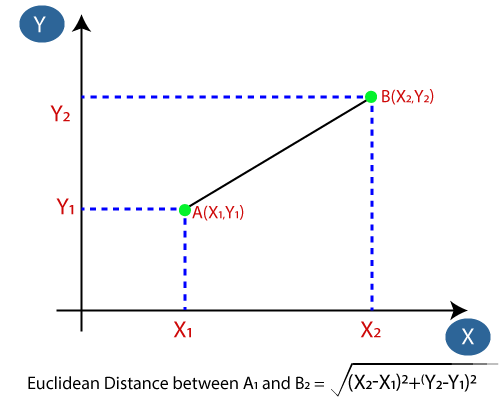
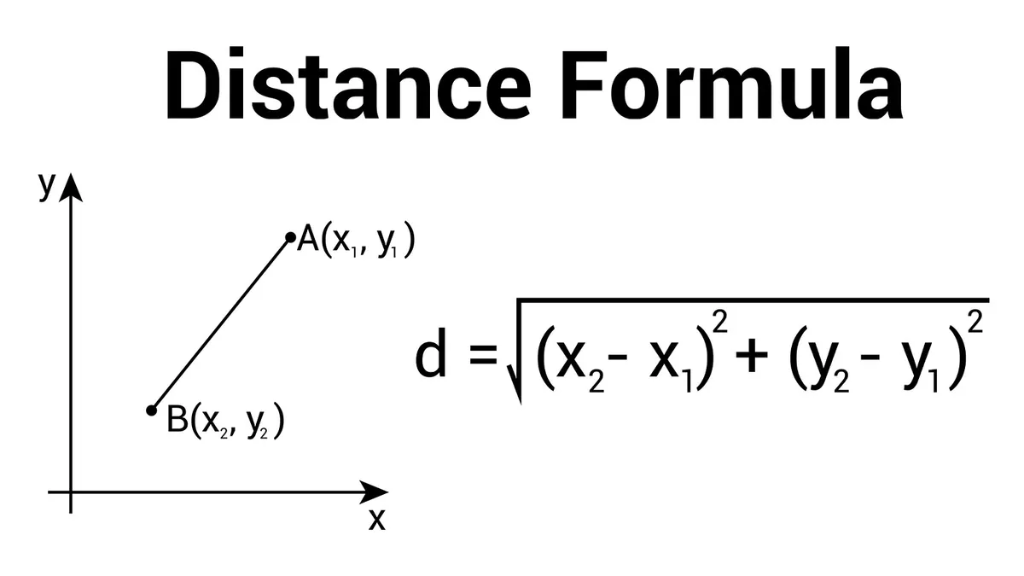
Note: the distance d between two points A and B can be computed with the following formula
d = sqrt((xA - xB)2 + (yA - yB)2)
To test the class Point and the distance method, create some Point instances and test them.
class Point {
    // complete the body of this class Point

    // declare properties for x and y coordinates


    // declare the initializer (constructor)


    // declare the function distance
    func distance(target: Point) -> Double {
        // complete the body of this function


    }
}

// Write your code to read user inputs for two points coordinations


// Convert from string input to double numbers


// Create two instances of two points and call distance to calculate the distance of
// two points
Sample Outputs (yours can be different):
Enter the first x and y:
5 5
Enter the second x and y:
7 5
The distance between X and Y is 2.000

Enter the first x and y:
3 3
Enter the second x and y:
4 4
The distance between X and Y is 1.414

Enter the first x and y:
-2.5 4
Enter the second x and y:
3 -5
The distance between X and Y is 10.548
🎲 Question 6. Randomisation (Sweaty Gamertag Generator)
Description
You are going to create a sweaty gamertag generator. We have created an array called the alphabet which contains all 26 letters in the alphabet.
Write some code to randomly pick 6 letters out of the alphabet to create a random, aesthetic 6 character gamertag.
HINT: You can add characters together with the "+" symbol. e.g.
var a = "Jerry"
var b = "Mouse"
var c = a + b
print(c) //The output would be: "Jerry Mouse"
Alright, complete your code as below here:
let alphabet =
["a","b","c","d","e","f","g","h","i","j","k","l","m","n","o","p","q","r","s","t","u","v",
"w","x","y","z"]

//The number of letters in alphabet equals 26

let gamertag = //Replace this comment with your code.

print(gamertag)
NOTE: The variable gamertag should be a String of characters like "vacbae" or "abcefg", it should not be an array.
🧑💻 Question 7. Closure (Stat Booster)
Description
Given a function to take two integer stats and a closure function which will call the closure function with a and b as arguments to boost the stats.
Your task is to call calculateBuff function and write inline functions which satisfy the comments below:
// Do not modify this function
func calculateBuff(a: Int, b: Int, operation: (Int, Int) -> Int) {
    print(operation(a, b))
}

// Call calculateBuff function and provide an inline closure so that it will return the
// larger value between two numbers to calculate ultimate damage and print it out


// Call calculateBuff function again and this time provide an another inline closure
// so that it will multiple two numbers together to multiply XP and print it out
Note: If possible, could you please make those inline closures to be in the form of trailing closures so it look neat and clean (check the lecture or this link: https://docs.swift.org/swift-book/LanguageGuide/Closures.html)
🤑 Question 8. Challenge question

Description
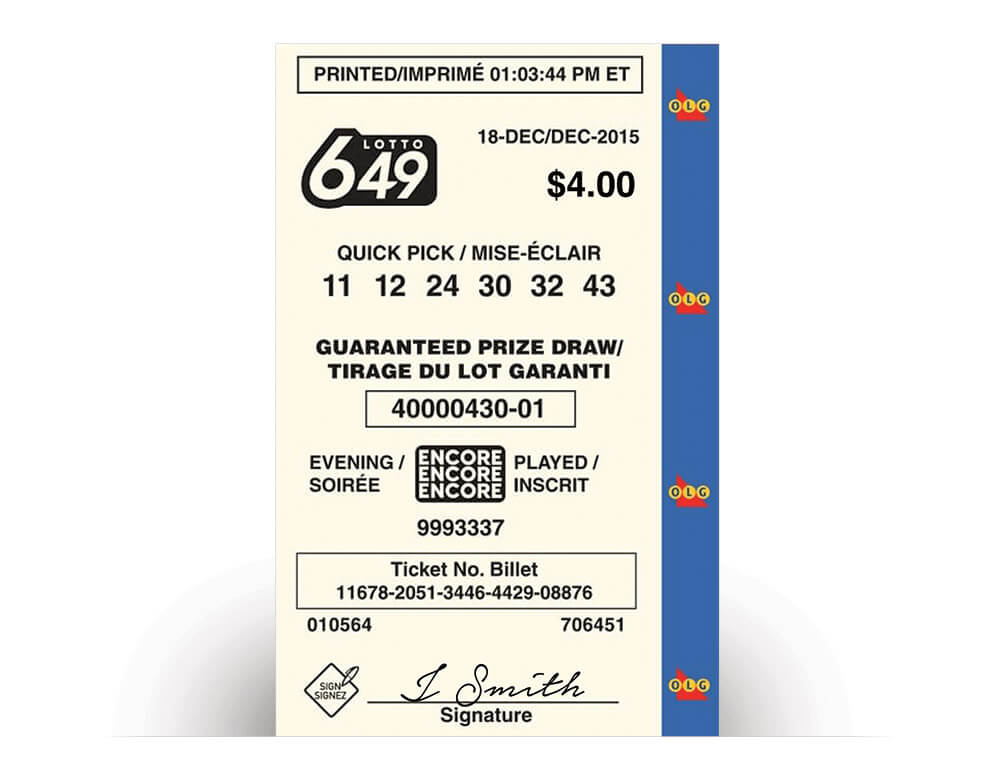
The 649 Lotto Lottery is a popular lottery game in Canada, offering players the chance to win significant cash prizes twice a week through a draw of six numbers from a pool of 49. Established in 1982, it is renowned for its large jackpots and additional bonus draws.
Noel Patricio won the Lotto 6/49 prize worth $68 million and is “Ontario’s newest multimillionaire”
Let’s build a lottery simulation 649 Lotto Lottery.
A lottery ticket is $4.
A ticket having 6 different numbers (from 1 to 49) (Can be repeated)
On a Saturday, they draw the lottery, and the winning numbers are: 11, 43, 24, 30, 5, 43
Match at each position:
- Match One or Two numbers to get a small prize. ($10)
- Match Three numbers to get a small prize. ($100)
- Matching Four numbers gets a bigger prize. ($1000)
- Matching Five is even bigger. ($5000)
- Matching ALL SIX of the numbers you might win millions. ($5 million in cash)
In the example, we got matches at position 1, 3, 4, 6 (4 numbers) = $1000
Requirements and Advice:
you can use both structs and classes to organize your code effectively. Here are some guidelines and an example to help you structure the code:
- Use structs to represent simple data models like a lottery ticket or a set of lottery
numbers. Structs are suitable here because they are value types and provide copy-on-write
behavior, which is useful for representing distinct tickets and results:
- Represents a lottery ticket with six numbers.
- Provides a static method to generate a random ticket.
struct LotteryTicket {
    // fill in the properties and functions


}- Use classes for managing the lottery game logic, such as drawing winning numbers and
calculating prizes. Classes can manage shared state and provide more flexibility for future
expansions of game rules.
- Manages the winning numbers and game logic.
- Provides methods to draw winning numbers and check the prize based on a given ticket.
class LotteryGame {
    // fill in the properties and functions


}- In your main program:
- Creates an instance of LotteryGame.
- Draws winning numbers and prints them.
- Creates a user ticket with predefined numbers and checks for a prize.
- Prints the prize amount.
Task 1:
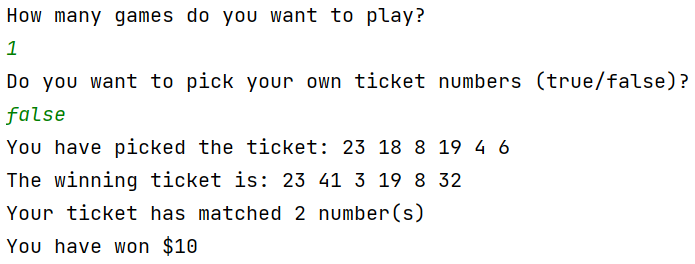
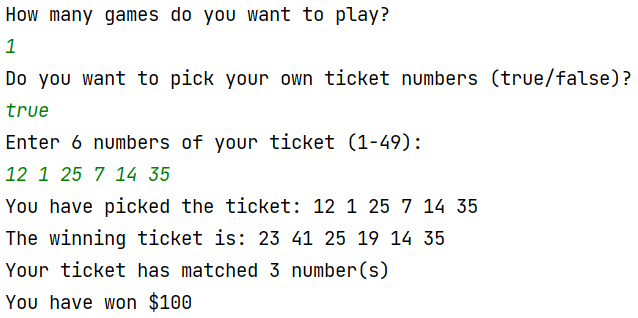
You need to write a simple program that allows you to buy a ticket with six random numbers, and generate the winning numbers and return what kind of prize you won (one game).
If you choose to play one game then you can have a choice to pick your own ticket numbers. But when you choose to play many games, to make it a realistic simulation of the lottery, then ticket numbers must be randomly generated.
Here is just an example of an implementation of 649 Lottery, you can try something different:
Task 2:
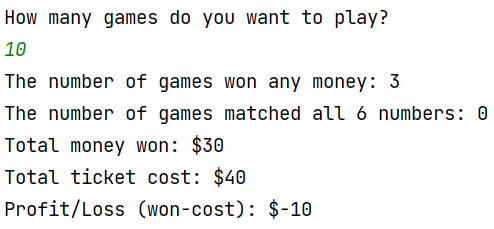
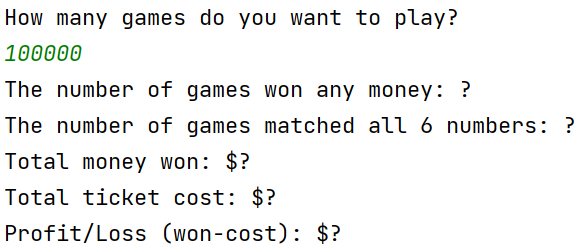
figure out if you got profit or loss when you learn this game many times (just like how a normal person keeps buying lottery tickets for many years). Each game round, a person will buy one ticket and compare it to one winning number. Note, it means each game has a different winning ticket number and the player only buys one ticket for each game.
Imagine you play this game 10 times:
Imagine you play this lottery game up to 100,000 times, can you figure out if you actually profit or lose in the long run? (? is for you to figure out)
Task 3:
Now, it is pretty fun to figure out the long run statistics of 649 lottery game, but you know that one of the biggest Vietnamese lottery game, Vietlott, has very similar rules like our 649 lottery game:
- Each ticket costs 10000 VND.
- The ticket also got 6 numbers.
- Each number goes up to 45 only, instead of 49.
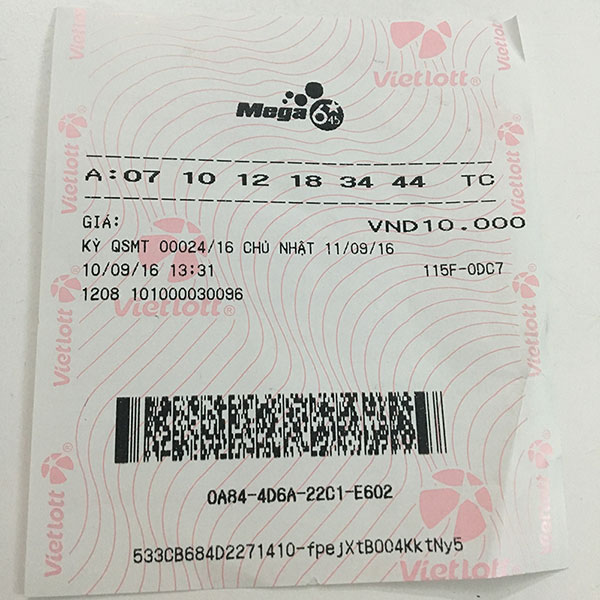

Here is the structure of Vietlott prizes:
| Prize Type | Result | Money Prize (VND) |
|---|---|---|
| Special Prize | Match 6 numbers | At least 12 billion |
| First Prize | Match 5 numbers | 10 billion |
| Second Prize | Match 4 numbers | 300.000 |
| Third Prize | Match 3 numbers | 30.000 |
Based on this information, could you roughly calculate the statistics of winning Vietlott and compare that to our 649 lottery game? Which lottery got a better chance?
Every week, they will draw the winning numbers and you would always buy one ticket to play everyday. After 1000 weeks (games) (20 years of your life), could you simulate how much money you have lost or profit by playing the Vietlott lottery?