🎯 Week 1 Learning Path
What you should be able to do
- Choose
letfor a value that does not change andvarfor one that does. - Trace a conditional or loop by hand and predict its output.
- Write a small function with parameters, a return type, and a clear name.
- Use arrays safely and build output with string interpolation.
Use this loop for every question
- Predict: write down what the starter code should print.
- Implement: replace only the requested comment or function body.
- Run: fix the first compiler error before looking at later errors.
- Probe: test a normal value and an edge case such as zero, a negative number, or an empty array when the task allows it.
- Explain: describe why the result is correct without reading the code line-by-line.
Checkpoint: by the end, you should be able to solve a small variation of each question without copying its sample output.
🚀 Start with Playgrounds for Swift
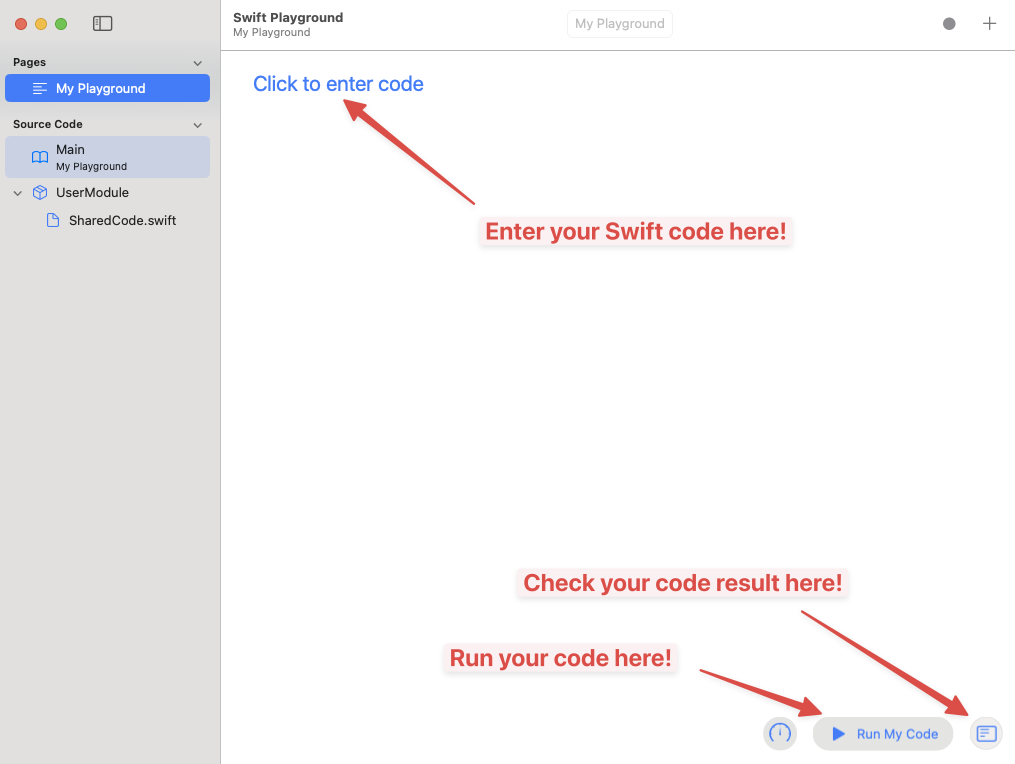
Step 1: Create a New Playground
Instruction: First, open the Swift Playgrounds application. From the top menu bar, click on "File" and then select "New Book" (or "New Playground") to create a new project. A new playground file, typically named "My Playground," will appear. Click on it to open and start coding.

Step 2: Write and Run Your Code
Instruction: Enter print("Hello, Swift!") in the editor, then
click Run My Code. Confirm that the exact text appears in the console or
results area before continuing. If it does not, check the issue navigator for the first red
error and fix that error first.
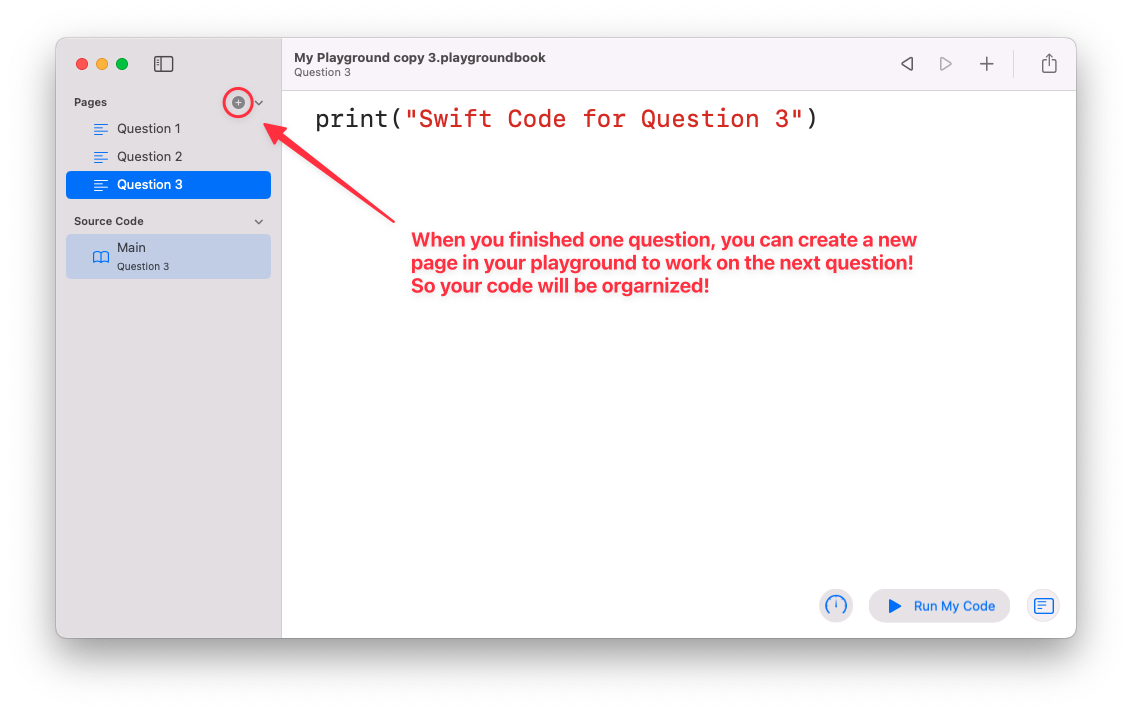
Step 3: Organize Your Work with Pages
Instruction: To keep your code organized, especially when working on different problems or sections, you can create new pages. Click the sidebar icon to view your pages. You can add a new page for each new question or part of your project. This allows you to manage your code in a structured way.
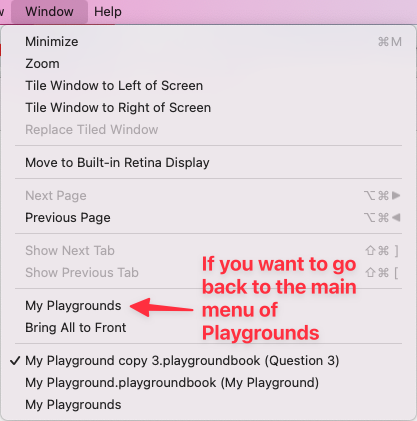
Step 4: Navigate Between Playgrounds
Instruction: If you need to go back to the main menu to see all of your Playground files, go to the "Window" tab in the top menu bar and select "My Playgrounds". This will take you back to the screen where all your saved playgrounds are listed.
Step 5: Share Your Playground
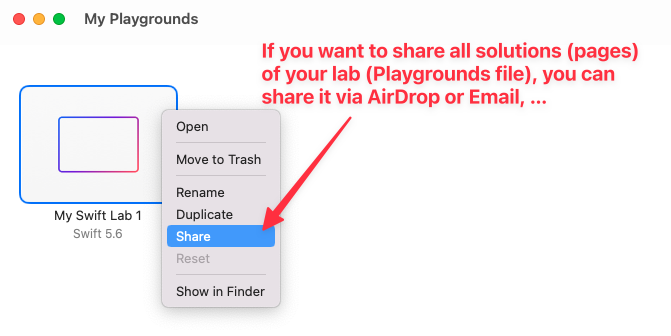
Instruction: When you want to share your entire Swift Playground file, which includes all the pages and code you've created, navigate to the "My Playgrounds" main menu. Right-click (or control-click) on the playground file you wish to share, and from the context menu, select "Share". You can then choose your preferred method, such as AirDrop or Email.
📝 Question 0. String Interpolation (Ultimate Gaming Setup & Pets)
Description
For this first question, you only need to learn how to combine strings together and prints it out to the screen to showcase your Ultimate Gaming Setup and pets! Feel free to get creative and customize the variables below with your own name, your favorite streamer, your absolute dream gaming setup, and your pets.
let streamerName = "IShowSpeed"  // Change this to your favorite streamer or your own name!
let setupItems = "PS5 🎮, RTX 5090 🖥️, RGB Lights 🌈" // Add your dream gaming gear here!
let itemCount = 3 // Update this number to match your setup
let pets = "🐱🐶" // Add your pets here!
let petCount = 2 // Update this number to match your pets

//Complete your code so it will print your setup items and pets by
//combining these constants into a string and display it
Sample Outputs (yours can be different):
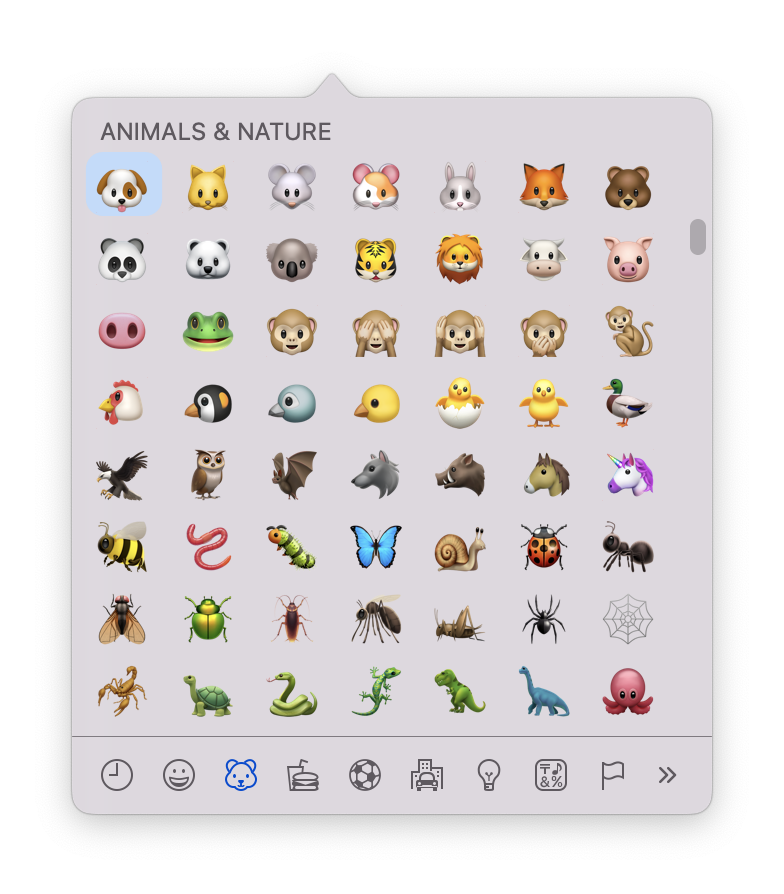
IShowSpeed has 3 epic items in their setup: PS5 🎮, RTX 5090 🖥️, RGB Lights 🌈 and has 2 pets: 🐱🐶Btw, to use emoji keyboard on MacOS: Press the Control + Command + Spacebar keys on your keyboard at the same time then you should see this emoji keyboard. Have fun!
🤔 Question 1. If Else conditionals (Viral Algorithm Check)
Description
Complete the function checkViral(views: Int) -> String to determine the status of a
video's views based on whether they are divisible by the algorithm's magic numbers:
5 and 6.
The function must evaluate the input count and return the appropriate message under these 4 scenarios:
- Scenario A (Divisible by both 5 and 6): Returns
"Your video with X views is viral on both TikTok and Reels!"(e.g., input30). - Scenario B (Divisible by 5 or 6, but not both): Returns
"Your video with X views is viral on TikTok or Reels, but not both."(e.g., input10or12). - Scenario C (Divisible by neither 5 nor 6): Returns
"Your video with X views flopped on both platforms."(e.g., input4). - Scenario D (Invalid views - less than or equal to 0): Returns
"X is not a valid view count"(e.g., input-10or0).
let viewCount = 4

func checkViral(views: Int) -> String{
   // Please complete the function body


}

let result = checkViral(views: viewCount)
print(result)
Sample outputs (only 4 possible outcomes as following):
Your video with 30 views is viral on both TikTok and Reels!

Your video with 10 views is viral on TikTok or Reels, but not both.

Your video with 4 views flopped on both platforms.

-10 is not a valid view count
🔄 Question 2. Loop (Combo Multiplier)
Description
Given the array of player's attack damage values in an RPG. Create another array called comboMultipliers. comboMultipliers should multiply each damage element in the attack array by the next element to simulate chain combo attacks. The last element should be multiplied by the first.
Here are a few examples to illustrate the logic:
-
Example 1: If
damageValuesis[3, 1, 4, 2],comboMultipliersshould equal[3 x 1, 1 x 4, 4 x 2, 2 x 3], which evaluates to:[3, 4, 8, 6]. -
Example 2: If
damageValuesis[5, 10],comboMultipliersshould equal[5 x 10, 10 x 5], which evaluates to:[50, 50]. -
Example 3: If
damageValuesis[1, 2, 3],comboMultipliersshould equal[1 x 2, 2 x 3, 3 x 1], which evaluates to:[2, 6, 3].
Replace the comments with your code.
let damageValues = [45, 73, 195, 53]

//Write your code here (you can do it with or without a function)


let comboMultipliers = //Replace this comment with your code.

print(comboMultipliers)
🖼️ Question 3. Print & Loop (Minecraft/Roblox Builder)

Description
Complete the function “drawBase” to print out a block structure for a Minecraft/Roblox base which has a width and a height. A visualize method to display the structure using emojis like 🧱 or 🟩
let width = 8
let height = 3

print("Current width: \(width)");
print("Current height: \(height)");

func drawBase(givenWidth: Int, givenHeight: Int) {
   // Complete the function body


}

drawBase(givenWidth: width, givenHeight: height)
Sample Outputs
Current width: 8
Current height: 3
🧱🧱🧱🧱🧱🧱🧱🧱
🧱🧱🧱🧱🧱🧱🧱🧱
🧱🧱🧱🧱🧱🧱🧱🧱

Current width: 2
Current height: 2
🟩🟩
🟩🟩

Current width: 1
Current height: 3
🧱
🧱
🧱
🧮 Question 4. Function (Gaming Damage Calculator)
Description
You're going to make a Gaming Damage Calculator. You'll need to write 4 functions such that a and b are added (buffs), subtracted (armor reduction), multiplied (crit damage), and divided (split damage among enemies) by each other when the code is run. It will request certain input values from you. The values must be numbers, and they will be substituted as variables a and b in your code. Separate lines will be required for the numbers.
If a = 3 and b = 4, This is what you would expect to be printed from the calculator:
7
-1
12
0.75
Because: 3 + 4 = 7 (Total Attack with buffs), 3 - 4 = -1 (Damage after armor), 3 x 4 = 12 (Critical damage hit), 3 ÷ 4 = 0.75 (Damage split)
let a = 5.0
let b = 6.0

// Write your code here to define 4 functions as requested


//To make the function calls below work, please write 4 functions above
print(add(n1: a, n2: b))
print(subtract(n1: a, n2: b))
print(multiply(n1: a, n2: b))
print(divide(n1: a, n2: b))
🔺 Question 5. Array (Battle Royale Safe Zone)

Description
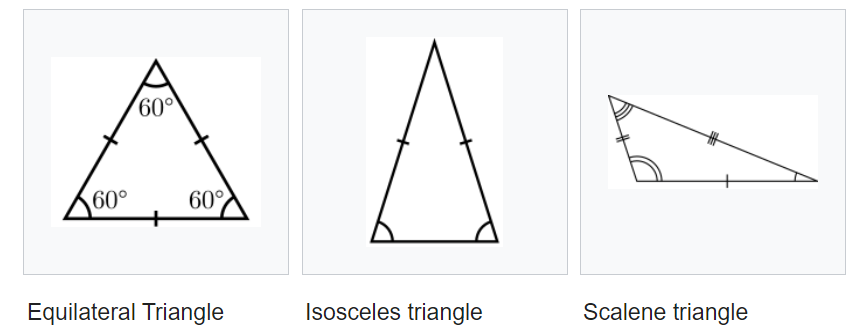
Write your code to have 3 side lengths of a Battle Royale Safe Zone triangle in an array and print out the geometry of the shrinking safe zone in a game which has 4 possibilities: Glitch/Not a zone, Equilateral, Isosceles or Scalene. Hint:
- To check if lengths of three sides to make a triangle: WikiHow Link
- Equilateral Triangle: has three sides of the same length
- Isosceles Triangle: has two sides of equal length
- Scalene Triangle: has all its sides of different lengths.
let sizes = [3, 6, 100]

// Complete your code below (print out sizes and classify the safe zone)
Sample Outputs
The three sizes of the safe zone are: 3, 6, 100
Glitch/Not a zone

The three sizes of the safe zone are: 6, 6, 9
It is an Isosceles safe zone

The three sizes of the safe zone are: 25, 25, 25
It is an Equilateral safe zone

The three sizes of the safe zone are: 3, 4, 5
It is a Scalene safe zone
🎲 Question 6. For big and small Dice Game

Note: For this question, you need to use Xcode instead of Swift Playgrounds to read input from users so you must open Xcode to do this question.
Steps to Start a New Swift Project in Xcode (Click Me to Expand)
Step 1: Create a New Project
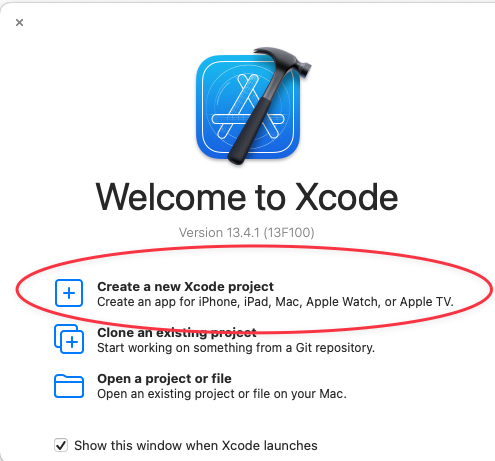
Open Xcode. When the "Welcome to Xcode" window appears, click on "Create a new Xcode project".
Step 2: Choose a Template
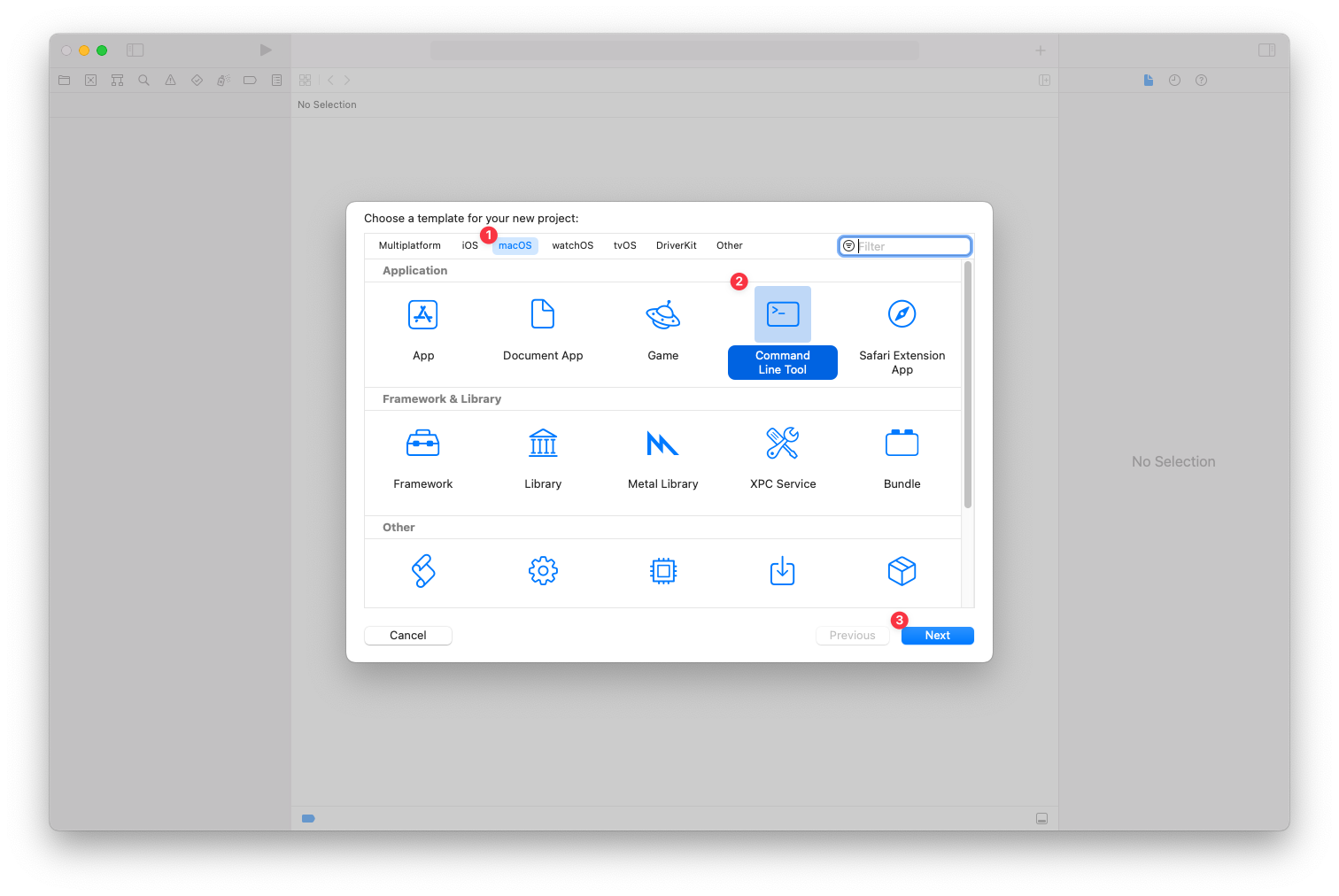
In the template selection window, first select the "macOS" tab. Then, choose the "Command Line Tool" template from the available options and click "Next".
Step 3: Configure Project Options
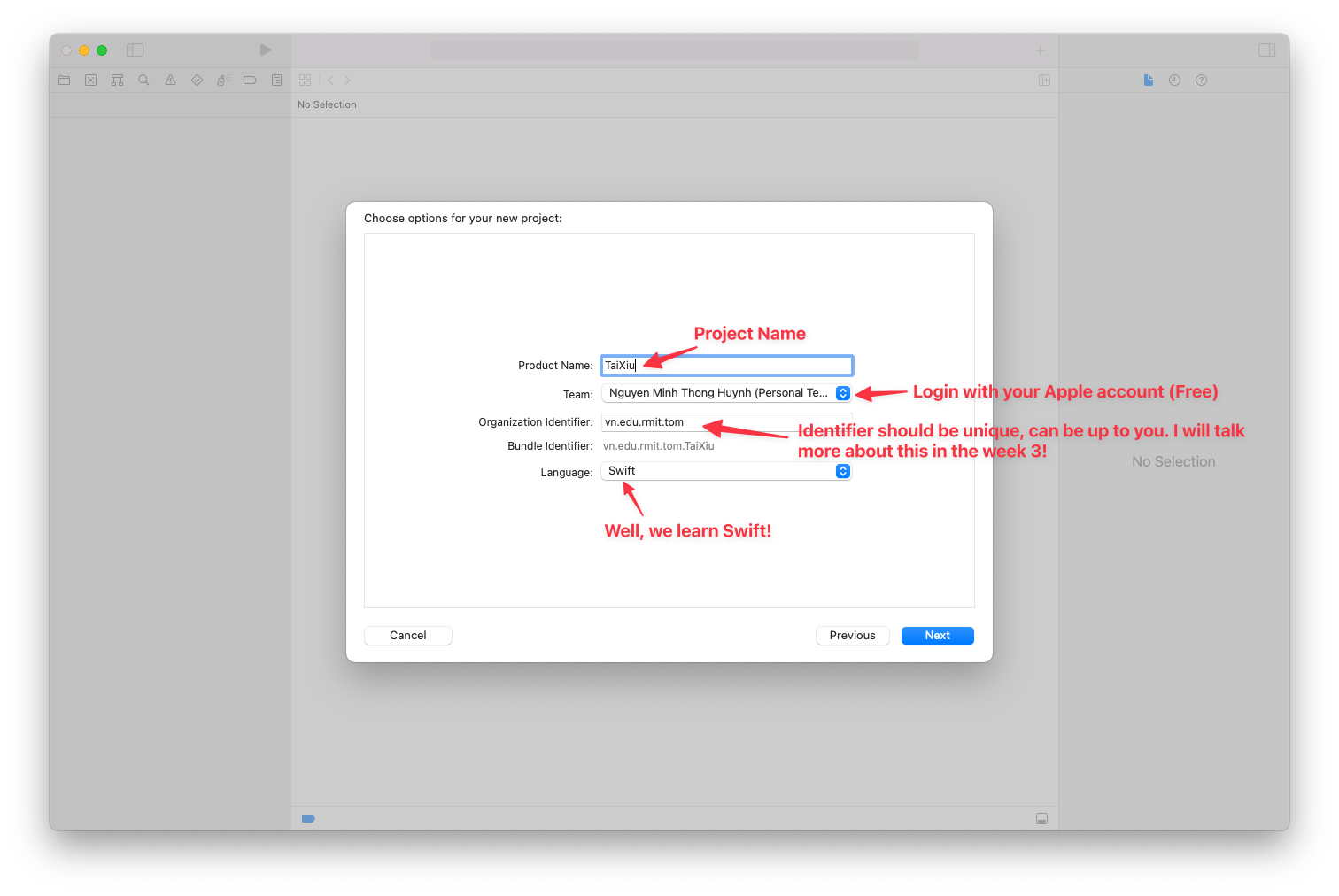
On the next screen, fill in your project details. Enter a "Product Name" (for example, TaiXiu) and provide an "Organization Identifier" if needed. Make sure the "Language" is set to "Swift", then click "Next".
Step 4: Save the Project
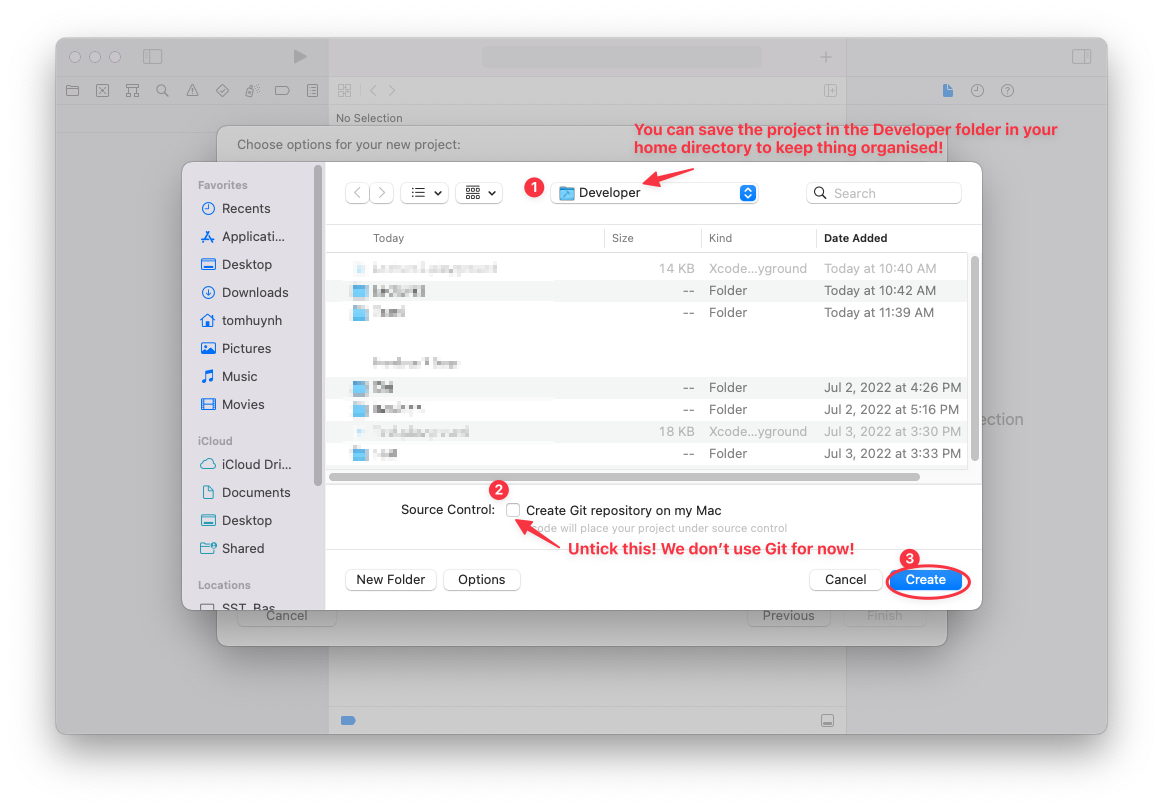
Choose a location to save your new project, such as the "Developer" folder. Make sure to untick the checkbox labeled "Create Git repository on my Mac", and then click the "Create" button.
Step 5: Write and Run Your Code
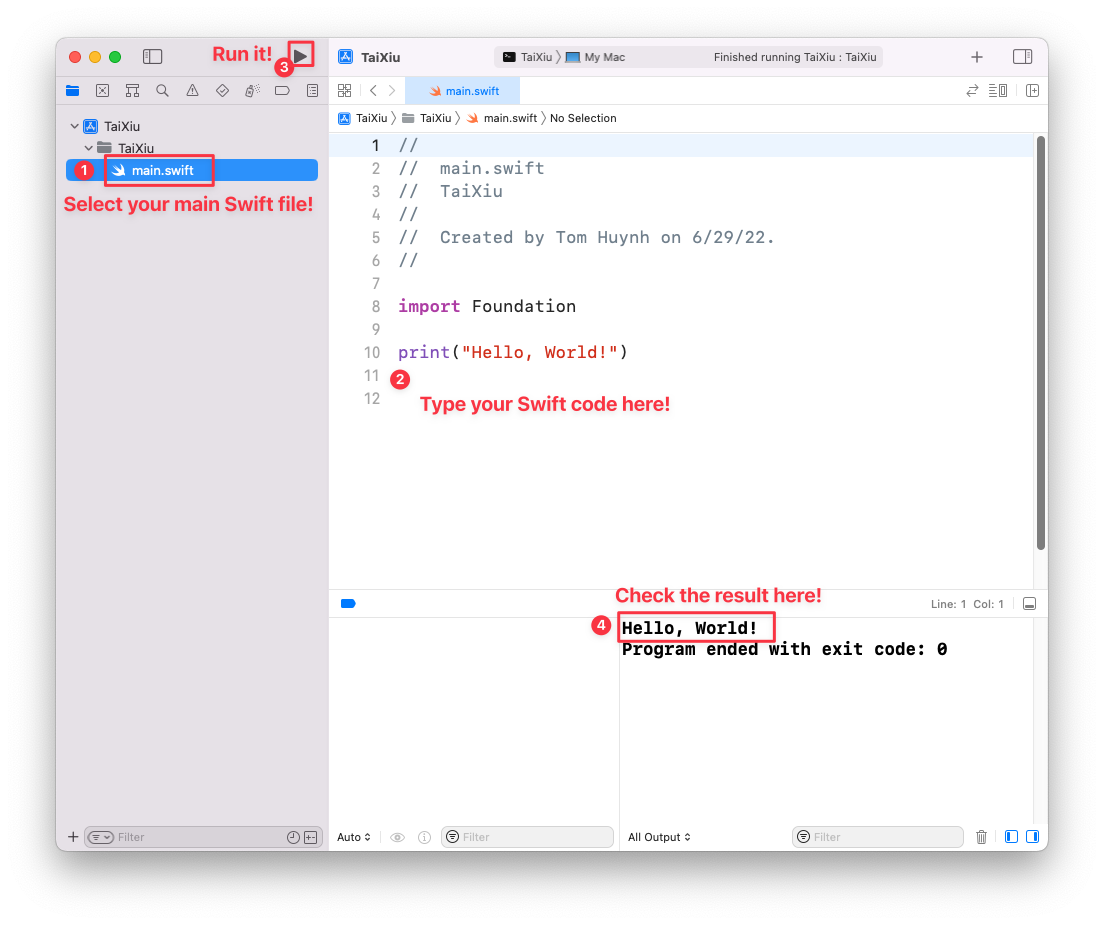
In the left-hand navigation pane, select the main Swift file, usually named main.swift. Enter your Swift code in the central editor pane. To run your code, click the "Run" button (the play icon) located at the top of the window. You’ll see the output in the console area at the bottom of the Xcode interface.
Description
During Tet holiday, big and small is a very popular dice game to play. It’s a game of pure chance that moves quickly. There’s no strategy or skill involved. Also, this kind of game is played all over the world. You will try to implement the simple version of the big and small game.
A normal dice got 6 numbers from 1 to 6. So there are two parties: the house (Tom) and the player (you). At the beginning of any round, you will put what you want to bet. The house will roll 3 dice at the same time. The result will be hidden from you until you pick your choice. The player will pick either Big or Small.
- Scenario 1: The sum of 3 dice being from 4 to 10: You will win the amount you have bet if you choose Small. Otherwise, you will lose, the house will take your bet.
- Scenario 2: The sum of 3 dice being from 11 to 17: You will win the amount you have bet if you choose Big. Otherwise, you will lose, the house will take your bet.
- Scenario 3: If all numbers of each dice are the same like (1, 1, 1) or (4, 4, 4) then you will lose regardless of what you pick, Big or Small.
Two parties can start with any money (usually you have much less). The player can keep playing until either the house or the player runs out of money. Please try your luck to win all the money for the house.

Sample Outputs (yours can be different):
The house has $1000
The player has $100
Try your luck to win all money of the house!
Round 1:
How much do you want to bet?
40
You have bet $40!
Do you want to bet big or small?(big/small)
big
The dices are: 5 4 3
The sum of 3 dices is 12!
You Won $40!
The house has $960
The player has $140
Do you still want to continue to play?(true/false)
true
Round 2:
How much do you want to bet?
200
You bet more than what in your wallet! Try again!
How much do you want to bet?
120
You have bet $120!
Do you want to bet big or small?(big/small)
small
The dices are: 5 3 6
The sum of 3 dices is 14!
You Lost $120!
The house has $1080
The player has $20
Do you still want to continue to play?(true/false)
true
Round 3:
How much do you want to bet?
20
You have bet $20!
Do you want to bet big or small?(big/small)
big
The dices are: 6 1 5
The sum of 3 dices is 12!
You Won $20!
The house has $1060
The player has $40
Do you still want to continue to play?(true/false)
true
Round 4:
How much do you want to bet?
40
You have bet $40!
Do you want to bet big or small?(big/small)
small
The dices are: 2 4 1
The sum of 3 dices is 7!
You Won $40!
The house has $1020
The player has $80
Do you still want to continue to play?(true/false)
true
Round 5:
How much do you want to bet?
80
You have bet $80!
Do you want to bet big or small?(big/small)
big
The dices are: 1 5 2
The sum of 3 dices is 8!
You Lost $80!
The house has $1100
The player has $0
You are out of money! Bye!
Hints:
Generate a random number (we will talk more about this in the next lecture): https://developer.apple.com/documentation/swift/int/random(in:)-9mjpw
Read an input from a user via keyboard (we will talk more about this in the next lecture): https://www.journaldev.com/19612/swift-readline-swift-print
Also, you need to figure out how to parse multiple numbers from a input string, like “1 23 45" to be [1, 23, 45]: https://stackoverflow.com/questions/42451363/swift-3-split-string-into-array-of-int
🐇 Question 7. Rabbit Family (Rabbit Glitch)
Description
A pair of rabbits (one male and one female) do not give birth until they are 2 months old. After 2 months old, each pair of rabbits gives birth to a pair of baby rabbits (including a male rabbit and a female rabbit) every month, multiplying like a viral TikTok video! It's honestly not very demure. How many pairs of rabbits are there after n months, and in the first month there is a pair of newborn rabbits?
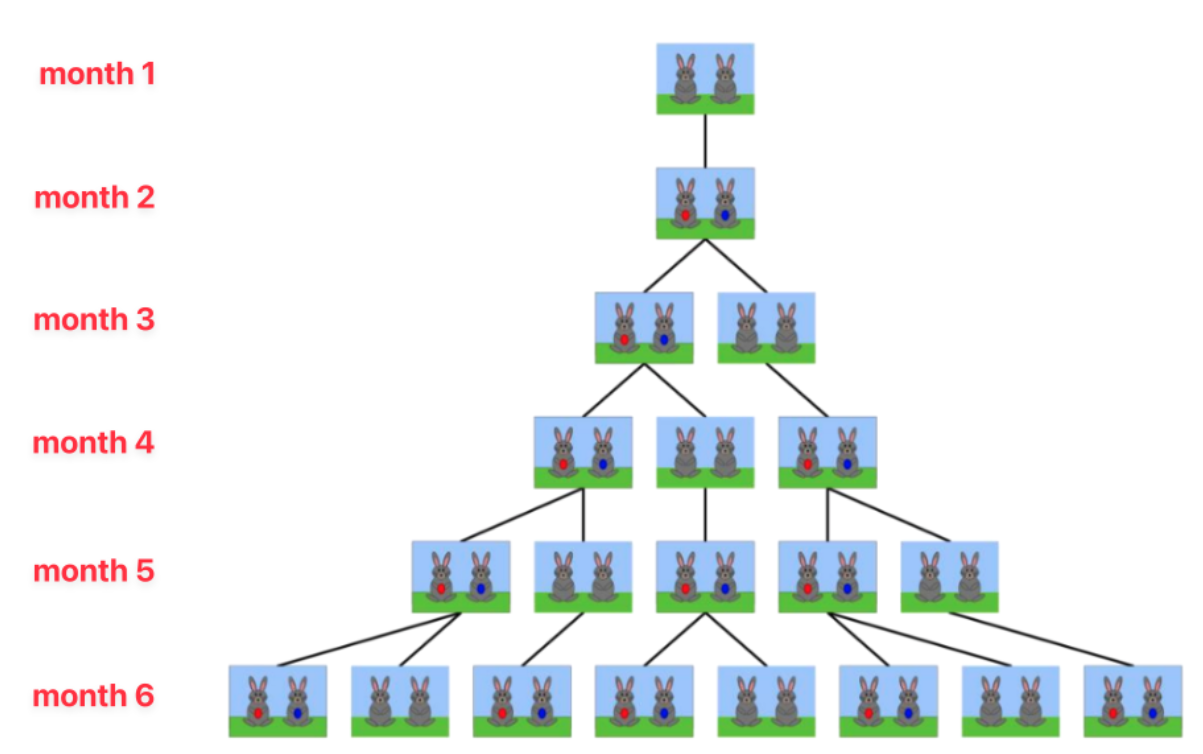
In the above figure, we assume:
- A pair of brown rabbits is a pair of rabbits with an age of 1 month. (not ready to give birth)
- The highlighted rabbit pair (red and blue) is a fertile pair (ready to give birth).
Looking at the figure above we see:
- 1st and 2nd month: Only 1 pair of rabbits.
- The 3rd month: this pair of rabbits will give birth to a pair of baby rabbits, so this month there will be 2 pairs of rabbits.
- The 4th month: only the first pair of rabbits gave birth, so at this point there are 3 pairs of rabbits.
- 5th month: there are two pairs of rabbits (the first pair and the rabbits are born in the third month) give birth together, so this month there are 2 + 3 = 5 pairs of rabbits.
- 6th month: there are three pairs of rabbits (2 pairs of rabbits first and a pair of rabbits born in the fourth month)
- Both gave birth at this time, so here there are 3 + 5 = 8 pairs of rabbits.
Input
A positive integer n.
Output
Number of pairs of rabbits at month n
Example:
numberOfRabbit(6)The output will be “The total number of pairs of rabbits at the month 6 is 8.”
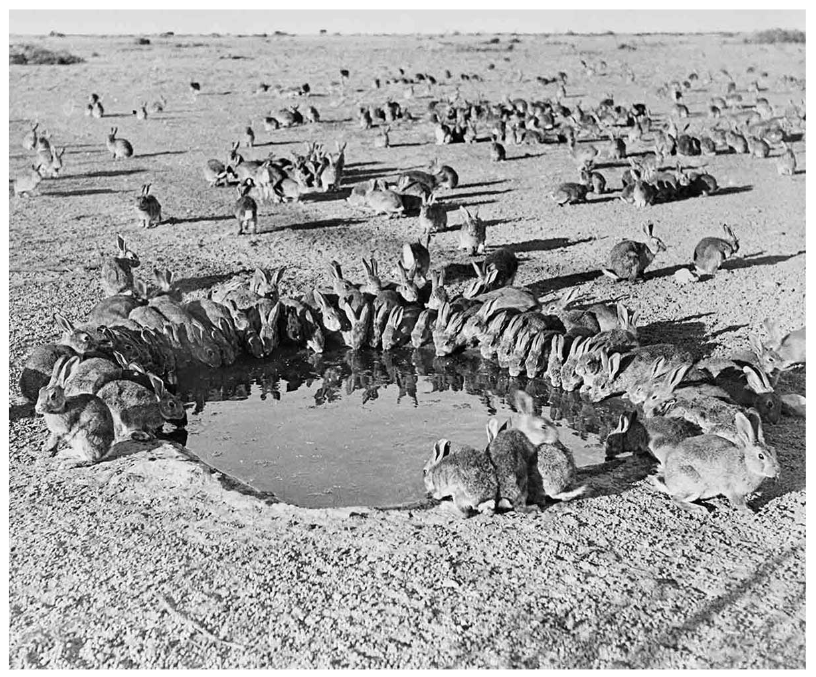
Fun fact about Australia 🇦🇺
This question is inspired by the real "rabbit disaster" in Australia, which caused the largest biological invasion in history. In 1859, Thomas Austin brought 24 wild rabbits to his estate in Victoria, Australia from the UK. However, rabbits are highly efficient breeders, with a single female capable of producing dozens of children in a year. By the 1920s, there were more than 10,000,000,000 (10 billion) rabbits across Australia in all states. That is how fast a rabbit can give birth! It is considered the fastest colonization by any mammal in recorded history, spreading at an astonishing rate of about 100 kilometers (62 miles) per year. With this large number of rabbits, they cause significant damage to crops, pastures, and natural ecosystems in Australia.
The environmental impact was catastrophic, and Australia is still dealing with it today:
- Erosion: By stripping the land of native grasses, shrubs, and seedlings, rabbits caused massive topsoil erosion, turning productive land into barren wastelands.
- Extinctions: They outcompeted native herbivores for food and destroyed the ground cover that small native mammals needed to hide from predators, playing a major role in the decline or extinction of several native Australian species.
Australia spent the entire 20th century trying to fix it, resorting to building thousands of miles of "rabbit-proof fences" across the continent and eventually introducing biological weapons (like the Myxoma virus in the 1950s) just to bring the numbers down from that 10-billion peak.